


Research shows that thanks to the strong ROI—around $40 for every $1 spent—gotten from email marketing campaigns, 89% of marketers use it to generate leads. This makes email marketing for attorneys one of the most effective marketing channels for law firms. It also means that if you're not using email marketing, you're missing out on a lot of leads that your competitors are snatching instead.
Creating a successful email marketing strategy can take time and effort. Still, when done right, email marketing efforts can be a powerful asset in your marketing arsenal.
This article will provide information on how to start email marketing for law firms, including:
- The reasons to choose email marketing for lawyers
- Your law firm's marketing strategy
- Content ideas for your law firm email marketing campaign
- The best email marketing services for law firms
- Measuring your email marketing campaign results
Why Choose Attorney Email Marketing?
You can use email target marketing for a law firm to promote events, share news and articles, and build a stronger brand. The reasons for choosing this powerful tool are below.
- Build relationships with clients. Lawyers can easily reach the right people with their message and services by building a targeted email list. Additionally, email marketing for lawyers allows them to remain in contact with new and existing clients and communicate new services or discounts they may be offering.
- Personalized legal messaging. Lawyers can tailor emails that cater to clients' needs by sending personalized content and responding to inquiries. These personalized messages can reach large numbers of potential leads at once, increasing website traffic, strengthening customer loyalty, and generating more referrals.
- Cost-effective marketing. Email marketing for law firms is cheaper than traditional advertising modes, such as television or radio spots.
- Competitive advantage. You can use it to stay top-of-mind with current clients by providing helpful legal tips and updates to large numbers of potential leads at once.
- Increased return on investment. Since the ROI considers every dollar spent on attorney email marketing, you should be aware that it has the best ROI of any digital marketing strategy.
Your Lawyer Email Marketing Strategy

You must have a plan before you start your lawyer email marketing campaign. We'll briefly go over the plan's main points here and then go into more detail about each in subsequent sections.
1. Define the KPIs and outline your email marketing goal. Law firms should monitor key performance indicators (KPIs) to determine their success. KPIs that you might track include email open rates, click-through rates, unsubscribe rates, and conversion rates. Examples of tools that can help you track KPIs are Google Analytics, Tableau, SimpleKPI, etc.
You can build a relationship with your audience and showcase your legal abilities by tracking the right KPIs and setting realistic goals.
2. Collect a list of clients. When you're building your email list, you're building your sales funnel; you want to make sure you give people a reason to sign up and get people excited about your firm, not just sign up because they have to.
You can start by offering clients incentives that would get them to input their contact details in the box. The rewards you want to provide to clients depend on your budget. Some of these sign-up bonuses may include:
- a free legal webinar
- a nice checklist or a cheat sheet
- a free eBook
- a PDF of your blog post
- an online course
- an email series on a topic
Furthermore, make it easy for law firm's website visitors to sign up for your email list by including a proper CTA, sharing a sign-up page on your attorney social media profiles, or adding a pop-up form offering something for free.
3. Make engaging content. The important thing to consider when thinking of a strategy is the content you will provide. Do you want to provide helpful legal tips, give updates on recent cases, or share news about your firm? The content you opt for should be what your audience needs.
Possible content could be an ebook, blog/academy article, tutorial, webinar, AMA with experts in your firm, etc.
4. Select suitable software. Before you choose any email marketing software for attorney, you need to decide what features to look for in an email marketing platform. Along with the basic product characteristics like mobile-friendly templates, email automation, customer support, list management, and tracking, good email software should:
- Provide reporting options to track your KPIs
- Integrate with other apps and software systems
- Come up with a range of pricing alternatives
- Support you with an easy-to-use email builder
- Show a nice selection of email templates
Content Ideas for Your Law Firm Email Marketing Campaign
As a law firm, you need to understand the importance of law firm content marketing and its role in attracting future clients. With so many competitors, it can take a lot of work to stand out from the crowd. That's why compelling content that will grab your readers' attention and make them want to learn more about your firm is crucial.
1. Provide a Case Study

This is a great way to help prospective clients understand how you can help them with their legal issues. It could briefly explain a recent court case or legal analysis that may interest your clients.
2. Show Q&A With One of Your Lawyers

This is an excellent way to introduce potential clients to your team and give them insight into your firm. It is also a way for clients to get answers to questions from an expert in the industry. You could include a description in an email to your client.
3. Provide Links to Educational Content

One way to stand out from the competition is to offer educational content in your emails. This can include articles, blog posts, or even infographics that explain the legal process or provide helpful tips. By providing valuable information, you will show prospective clients that you are an expert in your field and interested in helping them.
4. Give an Overview of Law-Related News

The law is constantly evolving, and there are always new developments to keep up with. Whether a new law is being passed, a court case is making headlines, or there is an update to existing law, there's always something going on.
You can send emails updating clients on what's going on in the industry for lawyers, law students, or anyone who likes staying informed.
5. Announce Events and Activities

A great way to keep clients up-to-date on the events happening in the firm is through email campaigns. Remind them about upcoming events, seminars, or webinars you will host or participate in.
The content you include in your advertising email must have the following:
- A subject line that piques curiosity and encourages recipients to open the email.
- A brief but compelling opening paragraph that draws readers in and sets the tone for the rest of the email.
- A mix of informative and persuasive content that educates recipients on the benefits of your legal services and convinces them to take action.
- A call-to-action (CTA) that is clear, concise, and easy to follow.
- A professional yet personal closing that leaves email recipients wanting more.
6. Improve Law Firm Email Campaigns for Mobile

Most people now use their phones as their primary email device, so ensuring your email is optimized for mobile is important. This means using a responsive email template that automatically adjusts to fit the device's screen size and making sure that the subject line and call to action are clear and concise. It would be best to take advantage of mobile-specific features like push notifications to ensure your messages are seen.
7. Include Images and Videos in Your Email Newsletters

Including images in your email newsletter can grab the attention of your subscribers and make your message more engaging. Images can also help to break up text and make your newsletter more visually appealing. When choosing images for your newsletter, be sure to use high-quality images that are relevant to your content.
Another effective way to go about this is through video. It can help boost open rates, click-through rates, and conversions since many prefer videos over texts. And when you include a video in your email, you can deliver more engaging and interactive content your audience might need. These videos can be in the form of:
- A legal tutorial titled ‘How to Lawyer Up’ or something similar
- An explanation of industry topics of interest or popular cases
- An announcement for discounts or promotions
- A teaser or invite to an upcoming legal event
- A thank you to clients who participated in an event or used your services
Other Lawyer Email Marketing Tips and Tricks
On top of the lawyer email marketing strategies listed above, there is more that can help maximize the success of your campaigns.
- Create follow-ups for your email. It helps to ensure that all leads are contacted quickly and efficiently. Furthermore, you remain top of mind with potential clients, while segmenting your leads will help you tailor each message to their specific needs.
- Segment your leads. You can do this by segmenting into different categories based on their interests and needs. That way, you can tailor your emails to specific audiences accordingly and increase the likelihood of conversions
- Re-engage with lost or cold leads. Doing so will open up new opportunities for engagement and establish relationships with those who may have previously been unresponsive. It gives you another chance to convert them into paying customers and keep them involved in your law firm's activities.
Leveraging Email Marketing for Your Law Firm with Kelsey Johnson at AWeber
Sasha Berson talks with Kelsey Johnson, Product Marketing Manager at AWeber. Kelsey will open your eyes to the powerful tool of email marketing for law firms.
.svg)

On this podcast episode, Sasha and Kelsey explore:
- How the majority of attorneys are missing a huge opportunity by not implementing email marketing.
- Kelsey’s 3 tips on how to make (more) money with email marketing.
- How automating the process of obtaining email addresses from your leads is a game changer.
- Why an effective email marketing strategy can tip the scales in your favor.
- Why it’s a good idea to use a lead capture tool and a follow-up sequence to automate the process.
- How hiring a lawyer is intimidating for most people and how email marketing can make the process easier for your potential leads.
- The value of educating your clients.
- When it makes sense to give away your best information for free by positioning yourself strategically.
Connect with Kelsey Johnson:
- Website - https://www.aweber.com/ (free software up to 500 subscribers)
- LinkedIn - AWeber
- YouTube - AWeber
- LinkedIn - Kelsey Johnson
- Twitter - Kelsey Johnson
- Kelsey’s Email Address - kelseyj@aweber.com
Find the Best Email Marketing Software for Lawyers
Knowing which best suits your firm can be difficult with so many email marketing platforms available.
Once you've determined what features you need, you can compare the price and reviews of the email service providers to find the best fit for your firm. If you're starting, perhaps choose a less expensive option. However, suppose you have a larger firm and plan to send many campaigns. In that case, you'll want to consider a more expensive option with more features and a higher delivery rate.
MailChimp
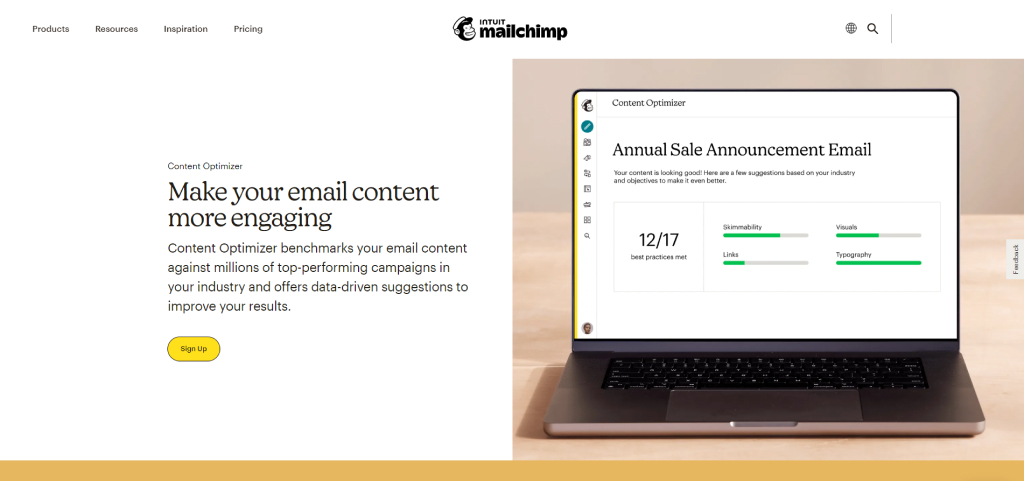
MailChimp offers a great email marketing tool that provides options like:
- creating email marketing segments to specific subscribers to see which content is more appealing for your clients and works best;
- integrating with your Google Analytics account, which allows you to see how many people came to your website via email;
- providing mobile-version preview and test;
- excluding inactive users so that you can concentrate on the audience that is interested in your legal services.
Moosend

Moosend is one of the best email marketing platforms you can use to create and send newsletters, promotional emails, and other marketing communications. It offers several features, including:
- opt-in message customization;
- suppression list allowing you to reach the right audience;
- ability to target specific audiences with tags;
- templated segmentation.
MailerLite

If you're looking for a campaign that will reach your target audience, consider using MailerLite. MailerLite is one of the best email marketing software that helps to:
- create a custom social media block for your emails;
- generate a new email automation segment when a subscriber completes a workflow;
- update your email footer en masse.
ActiveCampaign

ActiveCampaign is an excellent choice for most law firms—big or small—because of its great pricing system. By using ActiveCampaign, you can easily:
- split-test your email subject lines;
- create customized emails;
- create different types of email campaigns.
Hubspot

One of the best email marketing softwares out there, Hubspot offers the following email marketing features:
- perform A/B testing for different types of emails;
- preview your email before scheduling it;
- integrations with other apps and tools.
Measure Your Email Marketing Campaign Results

Suppose you're not tracking your legal marketing campaign results. In that case, you're missing out on valuable data that could help you improve your campaigns. By measuring these metrics, you can see how your email campaigns perform and make the necessary changes to improve your results.
Here are some key metrics to track:
- The number of email subscribers: This is a good indicator of the reach of your campaign.
- Open rate: This measures how many people are opening and reading your marketing emails.
- Click-through rate: This measures how many people click on the links in your emails.
- Conversion rate: This measures how many people are taking the desired action, such as signing up for your newsletter or purchasing.
Conclusion
In conclusion, email marketing campaigns can be an effective way to reach the target audience for your firm. It is actually over 40 times more efficient than Facebook or Twitter at bringing in new clients. And knowing the right approach for your email campaign will go a long way to drive traffic and increase sales for your firm.
If your firm can not shoulder the workload, you can hire professionals in digital marketing to make it easier. Choosing a professional law firm SEO agency like Grow Law Firm will ensure that your email marketing strategy is executed correctly. Our company has the experience and expertise to create and manage a campaign to reach your target audience, generate leads, and increase ROI. Contact us today!


 Get a clear picture of your firm's performance
- Boost your online presence


 Get a clear picture of your firm's performance
- Boost your online presence


.webp)


.webp)
.webp)


.webp)
.webp)
